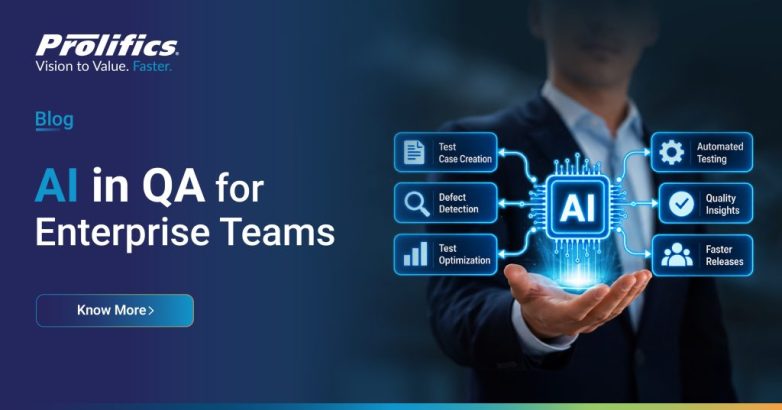
Artificial intelligence is changing how quality assurance teams design tests, analyze failures, and manage release risk. With clear controls, AI can help teams focus on important scenarios and reduce repetitive work, while people remain responsible for test strategy and release decisions.
For enterprise teams, AI in QA has two connected meanings: using AI to improve software testing, and testing AI features in products and workflows. A useful strategy covers both, applying AI to defined quality activities while checking AI-enabled systems in realistic conditions.
Prolifics help organizations strengthen quality engineering across applications, data, and AI systems. Our experts combine proven practices, automation, and scalable solutions to help reduce risk and release confidence.
What does AI in QA mean?
AI in QA uses machine learning, generative AI, and related techniques across quality activities. These systems can suggest testing, classifying failures, identifying patterns in results, or prioritizing work. Some tools also adjust automation when an interface changes. Their value depends on input quality, recommendation accuracy, and human checks.
Teams should distinguish between two workstreams. AI-assisted testing uses AI to help validate conventional software. Testing AI systems checks software shaped by models, prompts, retrieval, data, or autonomous actions. This work must assess qualities such as answer relevance, factual grounding, fairness, safety, robustness, and consistency alongside ordinary software behavior. ISTQB’s current Certified Tester AI Testing syllabus addresses testing AI-based systems as a dedicated professional discipline.
A chatbot may phrase the same correct answer differently on separate runs, so an exact-string assertion may miss whether it met the user’s needs. Use task-specific rubric, representative examples, and human review for high-impact cases. Evaluate the whole application, including prompts, data, business rules, interface, and downstream actions.
Where AI can support quality assurance
AI helps most when a team can identify a repeated task, supply usable data, and verify results. Common applications include the following.
- Generate test scenarios from clear requirements and recent code changes.
- Prioritize relevant regression tests using change risk and defect history.
- Identify unstable tests by comparing execution patterns across repeated builds.
- Assist testers with log analysis, failure grouping, and defect triage.
- Create useful synthetic test data that protects sensitive production information.
- Monitor changing AI outputs for drift, safety, and policy compliance.
These examples describe assistance, not proof of quality. A generated scenario may miss a business rule, or a prioritized suite may overlook a rare but serious failure. A self-healing script may keep running after the workflow changes unexpectedly. Testers should check suggestions against requirements and risk, preserve traceability, and confirm that automated checks still verify the right behavior.
AI can group similar failures or summarize likely causes across large test result sets. Engineers still confirm root causes before changing tests or closing defects because plausible summaries can omit context or misread failures.
Benefits depend on the problem being solved
AI does not improve quality by itself. It can help teams use testing capacity more effectively when a measurable bottleneck exists. A team with slow regression cycles might test risk-based selection on a representative application. A team with high maintenance effort might assess whether locator suggestions reduce repairs without hiding real interface defects. Teams testing generative AI need evaluation methods that reflect user tasks, not only generic benchmarks.
A pilot should compare current and AI-supported processes. Track effort, coverage, accuracy, and escape defects together. Faster runs have little value if they drop critical checks or increase false alarms. More generated cases do not prove stronger coverage unless they test distinct risks and meaningful outcomes.
Set a baseline, define an acceptable error rate, and assign an owner. AI may produce useful drafts that need expert revision. Report reviewed results rather than treating raw output as completed work.
Risks teams need to manage
AI introduces quality risks alongside efficiencies. Generated tests can repeat assumptions in their requirements. Models can misclassify failures, expose sensitive data through prompts, or change output after model or data updates. An AI agent may exceed its intended boundary if teams fail to test permissions and recovery behavior.
These risks call for a broader test approach. NIST’s AI Risk Management Framework encourages organizations to consider trustworthiness through AI design, development, use, and evaluation. Its Generative AI Profile gives additional guidance on risks specific to generative systems. Google’s responsible AI evaluation guidance also recommends testing against application-specific datasets and adversarial queries, not relying only on general benchmarks. Those sources support a practical rule: define the failure modes that matter in your workflow, then build tests that can reveal them.
Teams should pay particular attention to practical controls such as these:
- Protect confidential test data with approved environments and access controls.
- Test outcomes for bias across relevant user groups and realistic scenarios.
- Review AI-generated tests before adding them to critical release gates.
- Record relevant model, prompt, source data, and evaluation changes over time.
- Require human approval before allowing a consequential or irreversible system of actions.
- Monitor production behavior and investigate meaningful quality shifts across contexts.
A control needs a clear owner. Define who reviews model changes, approves thresholds, and handles incidents. Link requirements, test data, model or prompt versions, results, and decisions so teams can explain release approvals and later behavior changes.
A practical roadmap for adopting AI in QA
A phased rollout lets a team learn about a bounded problem before it depends on AI in a critical workflow.
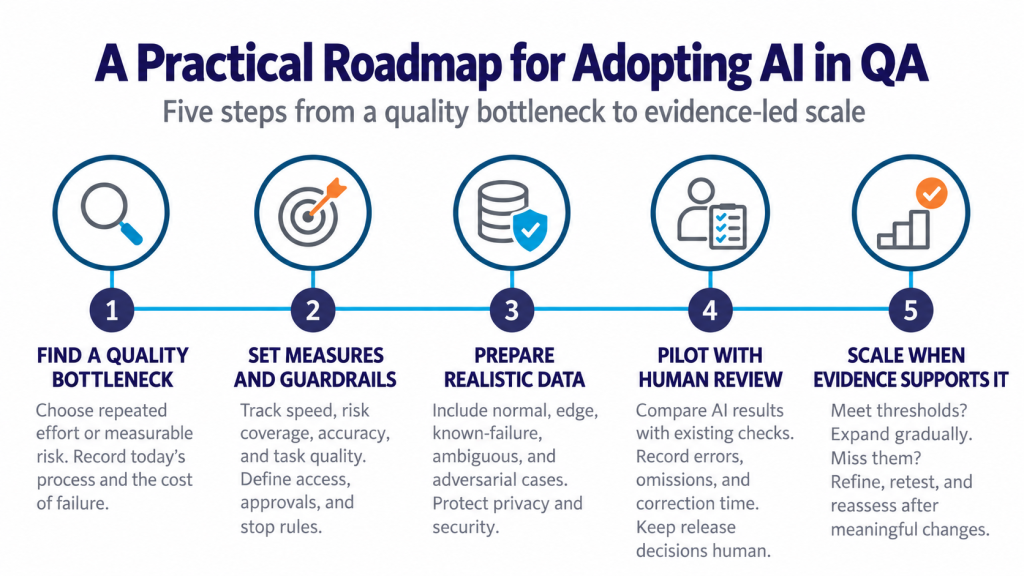
1. Identify a specific quality bottleneck
Start with an activity that consumes repeated effort or creates measurable risk, such as regression selection, test data preparation, failure triage, or evaluation of an AI feature. Record the current process and failure of cost. Choose a workflow that matters to the business and produce evidence the team can inspect.
2. Set the success measures and boundaries
Choose a few measures tied to the use case. For test prioritization, compare execution time with risk coverage and escape defects. For failure grouping, measure classification accuracy and review effort. For an AI application, measure task success, grounding, safety, and consistency. Define system access, approval points, and conditions that stop the pilot.
3. Prepare representative data and tests
Use data that reflects real workflows while meeting privacy and security requirements. Include normal cases, edge cases, and known failures. For generative AI, build an evaluation set from realistic requests, including ambiguous and adversarial inputs. Google recommends application-specific safety data alongside standard benchmarks [3]. Document the dataset’s source and limits.
4. Run a controlled pilot with human review
Integrate AI into a bounded test workflow. Keep existing checks available while the team compares results. Ask reviewers to record useful output, errors, omissions, and correction time. Test access, logging, handoffs, and recovery. Never let an unvalidated recommendation become a release decision.
5. Expand only after evidence supports it
Review results with engineering, QA, security, data, and business stakeholders. If the system meets thresholds, extend it gradually and monitor it. If it misses them, adjust data, prompts, workflow, or model, then retest. Reassess after meaningful changes because AI behavior and application context can shift.
How to measure AI quality assurance
Choose measures that expose tradeoffs instead of adoption alone. Track test design and maintenance effort, regression duration, stability, risk-weighted coverage, defect escapes, and recommendations accepted after review. For AI products, add task success, relevance, groundedness, safety, and performance across defined user groups. Select metrics based on the system and potential harm.
Use a stable evaluation set, then add cases when users encounter meaningful failures. Review summary scores and examples because averages can hide poor results for an important user group or request. Keep human review for ambiguous outputs and high-impact decisions. Automated evaluation informs decisions; it does not replace ownership.
Will AI replace QA testers?
AI can take on parts of repetitive test preparation, execution, and analysis. It cannot decide whether a requirement captures customer needs, whether behavior creates unacceptable risk, or whether release of evidence is sufficient. Quality engineers bring domain knowledge, exploratory thinking, system context, and judgment. Teams also need skills in evaluation design, data quality, risk analysis, and oversight.
AI should help people spend less time on repetitive tasks and more time investigating risk, challenging assumptions, and improving products. Redesign responsibilities around verified capabilities instead of assuming that a maturity ladder leads to autonomous testing.
Conclusion
AI can strengthen quality assurance when it addresses a risk, produces evidence teams can review, and keeps people accountable for release decisions. Start with a use case, measure results against a baseline, and expand only when safeguards work. Prolifics help enterprises build confidence through AI testing, automation, governance, and validation.
Frequently asked questions
What is the difference between AI in QA and AI testing?
AI in QA often means using AI to improve software testing. AI testing can also mean testing AI-based systems. Enterprise programs should address both and specify the relevant meaning for each use case.
Can generative AI create reliable test cases?
It can draft cases from requirements and examples, but teams must review accuracy, coverage, and assertions. Treat generated cases as suggestions until they pass established quality checks.
How should a company start using AI in QA?
Choose one bounded workflow, define a baseline and guardrails, and run a controlled pilot. Keep human review, inspect good and bad outputs, and expand only when evidence meets thresholds.
What should teams test in an AI-powered application?
Evaluate task success, relevance, grounding, safety, fairness where applicable, and robustness across realistic inputs. Also test access control, integration, performance, and recovery.