Enterprise AI becomes useful when it can respond to what is happening in the business, not just answer a question when someone asks. Event-driven architecture (EDA) helps make that possible by allowing a change in one system to trigger processing in another. A shipment delay, payment anomaly, equipment alert, or newly submitted document can initiate an AI-supported workflow without each system continuously asking for updates.
EDA does not replace APIs, and it is not a requirement for every AI application. It complements APIs when workflows must react to changes across systems, absorb bursts of work, or continue asynchronously. The architectural challenge is to deliver the right event and trustworthy context, then control what the AI system is allowed to do with them.
What event-driven architecture means for enterprise AI
An event is a record that something happened, such as an order being placed or a document being received. An event producer publishes that occurrence; an event channel or broker routes it; and one or more consumers process it. A consumer might update an operational dashboard, invoke a predictive model, start a workflow, or ask an AI agent to investigate. Microsoft’s architecture guidance describes these producers, channels, and consumers as the basic components of EDA.
For AI, an event is a trigger, not necessarily the full context needed for a sound decision. A model may still need current customer data, policy rules, historical transactions, or a system-of-record check. The event tells the workflow where to look; the surrounding architecture must make the relevant information available, accurate, and authorized.
Beyond APIs does not mean without APIs
An API exposes a way to request data or an action. An event communicates that something has happened. These concepts are complementary: an API can receive an external request that creates an event, and an event consumer can call an API to retrieve context or execute an approved action. APIs can also support asynchronous interactions, so the distinction is not simply API versus asynchronous processing.
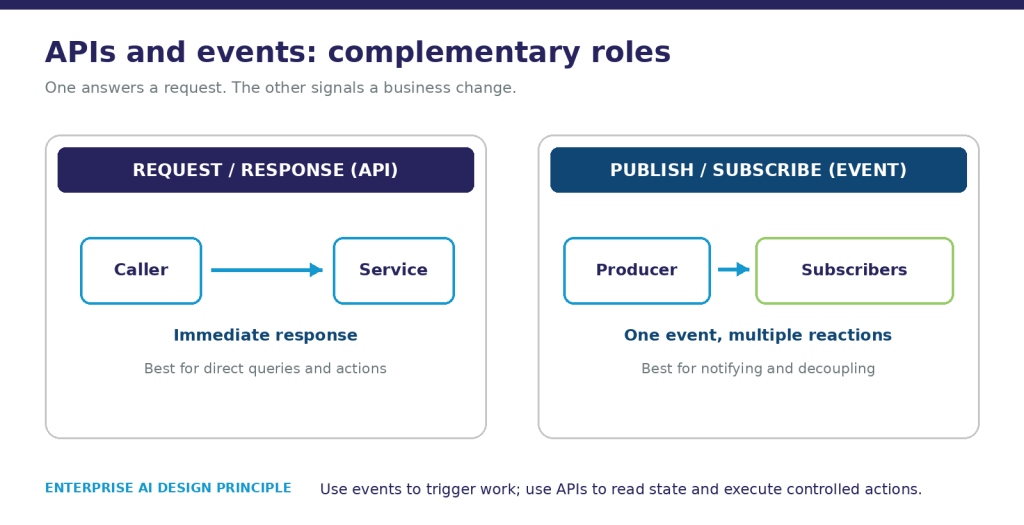
Figure 1. How APIs and event-driven architecture work together.
Choose the interaction based on the business need:
- Request and response: Use a direct API interaction when a caller needs an immediate answer, such as checking an account balance before completing a transaction.
- Event notification: Use an event when several systems may need to know that something changed, such as a shipment being delayed.
- Asynchronous work: Use a queue or event-triggered workflow when a task may take longer than a user can reasonably wait, such as analyzing a complex document package.
- Hybrid workflow: Combine events, APIs, and orchestration when a change triggers analysis but an authorized service must check current state and perform the final action.
Events are facts about occurrences; commands ask a specific recipient to do something. Keeping that distinction clear helps teams assign ownership and avoid treating every notification as permission to act.
Why event-driven architecture matters for AI
Timely signals can initiate useful work
An AI system can react to a relevant business event instead of waiting for a scheduled batch or a person to initiate a request. AWS describes examples such as a transaction triggering a fraud model and an uploaded file triggering an AI workflow. The value depends on the process: some decisions need seconds, while others are adequately served by hourly or daily updates.
Timeliness is not the same as correctness. Events can arrive late, out of order, or more than once. Teams must define how fresh context needs to be, how freshness is measured, and what happens when the required data is unavailable.
Independent consumers can support different decisions
The same business event may be useful to more than one consumer. A delayed shipment could update a customer service view, inform a planning model, and initiate a supplier review. The producer need not know the internal implementation of each consumer, although teams still need shared contracts, ownership, and governance.
Queues can buffer variable AI workloads
Model inference and agent workflows may have uneven execution times and consume constrained or costly resources. A queue can absorb a burst and let workers process tasks at a controlled rate. That buffer does not create unlimited capacity: teams still need concurrency limits, queue-age targets, backpressure, and a plan for work that cannot be completed on time.
Events can connect decisions to outcomes
An AI recommendation can become part of a broader workflow rather than an isolated response. A decision event can record a recommendation; an approval event can release an authorized action; and a subsequent outcome event can show whether the action completed. Together with logs and business records, these events can support monitoring and investigation. They do not, by themselves, guarantee a complete audit trail.
A practical example from signal to action
Consider a manufacturer monitoring a critical supplier shipment.
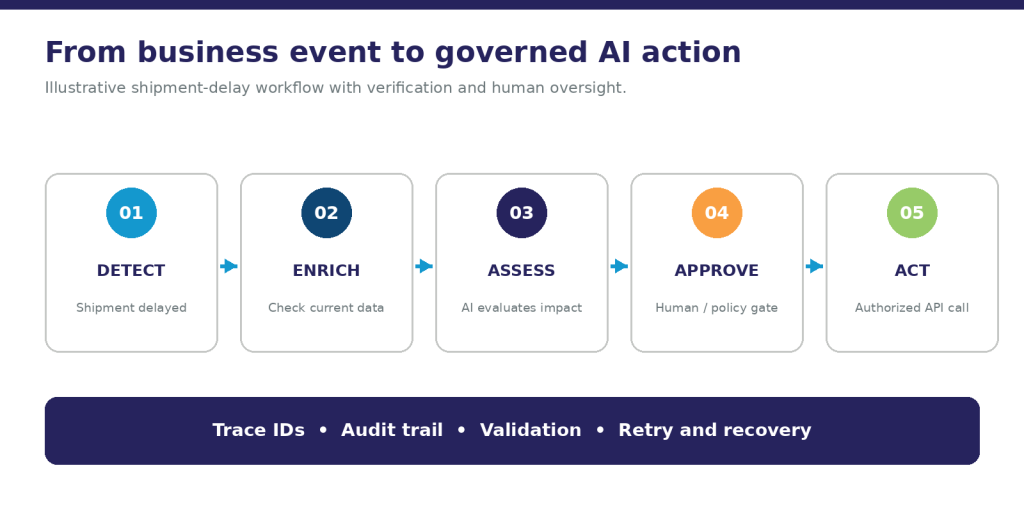
Figure 2. How business events trigger AI analysis, approvals, and actions.
- Detect: A logistics system publishes a shipment-delay event with a shipment identifier, occurrence time, source, and event version.
- Validate and enrich: A consumer checks the event contract, prevents duplicate processing, and retrieves current order, inventory, and production-plan data from authorized systems.
- Assess: A forecasting model estimates potential disruption. An AI assistant summarizes affected orders and proposes options, using the available evidence and stating uncertainty.
- Apply controls: Business rules determine whether a planner must review the recommendation. High-impact changes remain subject to human approval.
- Act: After approval, an authorized service calls the relevant planning API. The service checks the current state again before making the change.
- Observe: The workflow records the event, context version, model and prompt versions where relevant, recommendation, approval, action result, and any correction.
Choose the pattern to fit the workflow
Publish and subscribe is useful when multiple independent consumers need notification of the same business change. It provides flexibility, but teams must understand delivery guarantees and how failures are handled by the selected platform.
Queues and workers are useful when tasks need buffering and controlled processing capacity. Define retry limits, timeouts, dead-letter handling, and ownership of unresolved work.
Event streaming is useful when consumers need to process a continuing sequence of events or reprocess retained history. Replay depends on the platform, retention policy, permissions, and available history; it is not a universal feature of every broker. Microsoft explains the differences between publish-subscribe and event streams, including partition-level ordering in its described streaming model.
Orchestration is useful when a multi-step process needs explicit state, approvals, timeouts, and recovery. A central coordinator adds control but also introduces a component that must itself be operated reliably. A workflow can combine orchestration with event-driven notifications and API calls.
Build reliability into the event path
EDA shifts complexity into the relationships between systems. The following controls should be designed before a critical workflow goes live.
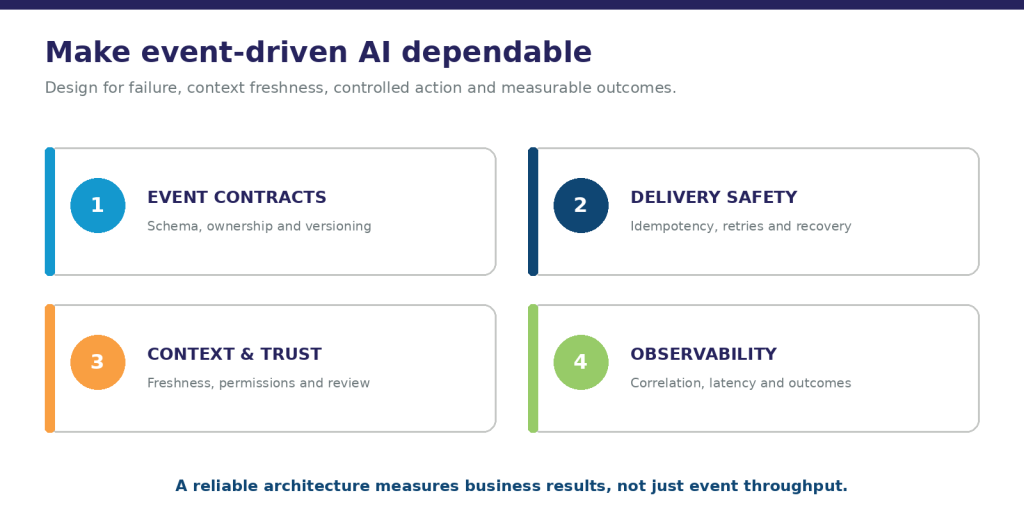
Figure 3. Reliability controls for event-driven AI systems.
- Contracts and ownership: Define event names, meaning, producer and consumer owners, required fields, schema versions, compatibility rules, and retirement procedures. Document whether an event is a notification, a state change, or a command.
- Duplicate protection: Use stable event and business-operation identifiers. Design consumers and downstream actions to be idempotent so a retry does not create a second payment, notification, or order change. AWS integration guidance explains why duplicates must be anticipated.
- Ordering and freshness: Define ordering requirements by business entity, not just globally. Handle late or missing events, reconcile with the system of record, and establish freshness limits for decisions.
- Failure recovery: Use bounded retries, backoff, dead-letter or quarantine paths, alerts, and tested recovery procedures. Before replaying events, ensure that downstream effects are protected against duplication.
- Observability: Link the originating event to workflow steps and downstream actions using correlation identifiers. Monitor event lag, queue age, failure and retry rates, model latency, cost, and business outcomes.
- Cost and throughput: Filter irrelevant events, consolidate related signals where appropriate, set concurrency limits, and reserve model calls for situations where AI adds value beyond deterministic rules.
Govern context, models, and actions
The event channel is part of the enterprise data estate. Classify event data, minimize sensitive payloads, restrict who can publish and subscribe, encrypt data as appropriate, and set retention and deletion policies for events, logs, model inputs, and outputs. Where possible, share an authorized reference to sensitive data instead of copying the data into every event.
Treat external event content and retrieved documents as untrusted input. Model output should be validated before it reaches a business system, and an agent should receive only the permissions needed for its task. Put approval or confirmation points before consequential actions, and maintain a clear owner for each decision and exception.
An event-driven design also needs evaluation beyond infrastructure uptime. Test the model on representative cases, including incomplete or conflicting context, unusual event sequences, stale data, and failed downstream actions. Monitor recommendation quality and business impact alongside system performance.
Measure the workflow as a whole
A useful scorecard connects three layers:
- Event and platform health: Delivery lag, queue age, throughput, duplicate rate, failed events, recovery time, and service availability.
- AI and decision quality: Task-specific precision or error rates, human override and correction rates, context freshness, model latency, and cost per completed workflow.
- Business and control outcomes: Time from event to resolution, avoided rework, downstream errors, approval compliance, and completeness of audit evidence.
Set targets against a baseline for the chosen process. An impressive number of events processed or model calls made does not demonstrate that the workflow is reliable or valuable.
A practical path to production
- Choose a bounded decision. Select a process where an identifiable event can trigger a useful response, with an accountable owner and measurable outcome.
- Map the existing flow. Identify systems of record, event sources, APIs, decision points, human approvals, and current bottlenecks.
- Define the contract and controls. Agree on event semantics, data ownership, freshness, access, delivery expectations, failure handling, and action authority.
- Prove the end-to-end path. Test from event generation through enrichment, AI assessment, approval, action, and outcome. Include duplicates, late events, failed APIs, and replay.
- Operate and expand deliberately. Establish monitoring, support ownership, cost limits, and change control. Reuse proven patterns as additional use cases justify them.
How Prolifics can help
Prolifics helps enterprises connect AI ambitions to the data foundations, integrations, and operating practices needed to put them into production. Its Data and AI services include data engineering, streaming and batch pipelines, MLOps, governance, and managed services. Its AI services include architecture and platform readiness assessments, agentic AI, and enterprise integration.
A practical first step is to select one event-driven AI workflow, define the business decision and acceptable risk, and assess the event sources, current-state data, integration points, and controls required to operate it reliably. Connect with Prolifics to explore the right architecture and implementation roadmap for that workflow.
Frequently asked questions
Is event-driven architecture a replacement for APIs?
No. Events communicate that something happened; APIs provide interfaces for requesting information or actions. Many enterprise workflows use both, with events triggering work and APIs supplying context or executing authorized changes.
Does every AI application need event-driven architecture?
No. A direct request-response application or a scheduled batch may be simpler and sufficient. EDA is particularly useful when timely changes must trigger independent consumers or when work should continue asynchronously.
Does an event stream guarantee real-time, accurate AI decisions?
No. Delivery delays, missing or duplicate events, stale context, model errors, and downstream failures can affect decisions. Define freshness requirements, validation and reconciliation, model evaluation, and action controls for the specific workflow.
What is the difference between an event and a command?
An event records an occurrence, such as an order being submitted. A command asks a particular component to perform an action, such as updating that order. An event can trigger a workflow that later issues an authorized command.
How should enterprises start?
Start with one bounded workflow that has a meaningful trigger, a clear owner, measurable outcomes, and manageable risk. Test the complete path, including duplicate events, delayed context, human review, action failure, and recovery, before expanding.