
Many teams build an AI pilot in a few weeks. The demo looks great. Leaders get excited. Then the project slows down. Questions about accuracy, safety, cost and trust appear, and nobody has clear answers.
AI-TLC gives teams a simple way to answer those questions. It treats testing as a full journey, not a last step before launching. This blog explains how it works and how to use it.
Why AI pilots struggle to reach production?
A pilot only needs to work in a controlled setting. Production must work for real users, real data and real risk. That gap is where many projects get stuck.
Common reasons include:
- Teams test with only a few easy examples.
- Nobody defines what a good answer looks like.
- Data quality problems show up late in delivery.
- Safety and privacy checks start after the build.
- Model behavior changes and nobody tracks the change.
- Ownership between business and IT teams stays unclear.
Traditional testing does not fit well here. A normal app gives the same output for the same input. An AI app may answer differently each time. So teams need new methods.
What AI-TLC means for enterprise AI?
AI-TLC is a lifecycle approach to testing AI systems. It covers the use case, the data, the model, the application and life after release. The goal is simple: build trust in AI before users depend on it.
It rests on three ideas:
- Test early, from the first use case discussion.
- Test often, because AI behavior changes over time.
- Test wide, covering quality, safety, security and speed.
AI-TLC also brings business, risk, data and engineering teams together. Everyone agrees on what success means. That shared view makes release decisions faster and clearer.
The five stages of an AI-TLC approach
AI-TLC has five stages. Each stage builds on the one before it.
Stage 1: Define use cases, intended behavior and risk boundaries
Start with the problem. Write down who will use the AI, what it should do and what it must never do.
- Name the exact use case and expected user.
- Describe the intended behavior in clear, plain words.
- Set risk limits for privacy, bias and harm.
- Agree on success measures before any build starts.
Stage 2: Prepare data, prompts, context and test scenarios
Good tests need good inputs. Gather the material your AI will use and the cases it will face.
- Clean and label the data used for grounding.
- Version your prompts so every change is traceable.
- Collect real user questions, including messy, unclear ones.
- Build scenarios for normal, rare and risky cases.
Stage 3: Evaluate accuracy, relevance, consistency and safety
Now measure how the AI behaves against your goals. Use both automated scoring and human review.
- Check accuracy against trusted answers and source documents.
- Test relevance so answers fit the question asked.
- Run the same prompt often to check consistency.
- Probe for unsafe, biased or private information leaks.
Stage 4: Assure applications, integrations, agent actions, security and performance
Evaluation looks at the AI. Assurance looks at the whole system around it.
- Test every link with apps, databases and APIs.
- Check each action an AI agent can take.
- Run security tests for prompt injection and leaks.
- Measure speed and cost under real traffic loads.
Stage 5: Improve through retesting, drift reviews and ongoing refinement
Release is not the finish line. Models, data and users keep changing.
- Retest after every model, prompt or data change.
- Review quality drift on a clear regular schedule.
- Turn user feedback and failures into new tests.
- Track key trends on a shared quality dashboard.
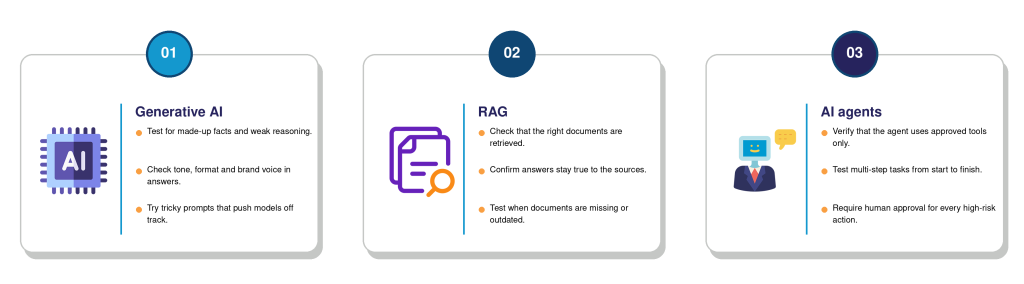
4. Applying AI-TLC to generative AI, RAG and AI agents
Each type of AI has its own risks. Focus your testing where the risk is highest.
5. Integrating AI testing into the software delivery lifecycle
AI testing should sit inside your normal delivery flow, not beside it.
- Add AI test suites to your CI/CD pipeline.
- Block releases when quality scores fall below limits.
- Run quick safety checks on every code change.
- Share results with product, risk and security owners.
This way, AI quality becomes part of daily work. Developers get fast feedback, and leaders get clear proof before go live.
6. How to measure AI readiness for production
Ask one simple question: is this AI ready for real users? Use clear scores to answer it.
- Accuracy: share of answers that match trusted sources.
- Safety: number of harmful or private outputs found.
- Consistency: how stable answers are across repeated runs.
- Performance: response time and cost for each request.
- Coverage: how many risky scenarios your tests include.
Set a pass mark for each score. Then review them together before every release. Prolifics can help you define these scores and pass marks for your own use cases.
7. How Prolifics helps teams build confidence in AI
Prolifics helps enterprises move AI from pilot to production with confidence. With deep experience in testing, data and digital engineering, the team brings structure to every AI-TLC stage.
Prolifics can help you:
- Define use cases and risk limits with stakeholders.
- Build test data, prompts and realistic evaluation scenarios.
- Run quality, safety and security testing at scale.
- Automate AI checks inside your existing delivery pipelines.
- Set up monitoring for drift and ongoing improvement.
Whether you run a chatbot, a RAG tool or a group of agents, Prolifics can meet you where you are. The team works as a partner, so your people learn the practices and keep them.
8. Moving from experimentation to responsible scale
AI delivers value only when people trust it. Trust comes from proof, not promises. AI-TLC gives you that proof at every step.
Start small. Pick one use case, define its limits, build a test set and measure the results. Then repeat with the next one. Teams that work this way ship faster, face fewer surprises and protect their users and their brand. If you want a partner for the journey, Prolifics can help you plan, test and scale with confidence.
Conclusion
AI-TLC is a lifecycle approach to testing AI systems. Unlike traditional testing, which checks fixed outputs, it accepts that AI answers can change. It treats testing as a continuous journey that covers the use case, data, model, application and life after release. Its goal is trust.
It rests on three ideas: test early, test often and test wide. Early testing finds risks while fixes are cheap. Frequent testing catches changes in behavior. Wide testing covers quality, safety, security and speed.
Frequently asked questions
How is AI-TLC different from traditional software testing?
Traditional testing checks fixed rules and expects the same result every time. AI-TLC works differently because AI answers can change. It tests for quality, safety and consistency, not just pass or fail. It also covers data, prompts and agent actions, and it continues after release through drift reviews and regular retesting, so quality stays high as things change.
When should AI-TLC begin in an AI project?
It should begin on day one, during use case planning. Early work on intended behavior, risk limits and success measures saves time later. Teams that wait until the build is finished often find problems that are costly to fix. Starting early also helps you collect the right data and test scenarios while the project is still flexible.
What should teams test before deploying an AI application?
Teams should test accuracy, relevance, consistency and safety of answers. They should also test integrations, agent actions, security, cost and speed. Add checks for privacy and bias too. Finally, confirm that a human can step in when the AI is unsure or the risk is high, and that the team can roll back quickly.
How can teams monitor AI quality after release?
Track the same scores you used before launch, using live traffic and sampled conversations. Set alerts for drops in accuracy, rising unsafe outputs and unusual cost. Review drift on a fixed schedule, and retest after any model, prompt or data change. Feed real user issues back into your test sets so they improve over time. Prolifics can set up this monitoring and reporting for you.